


Kangaroo: Simple Home Security
3.61.32K Reviews
App Specs
- Version
- 11.17.0
- Updated On
- License
- Free
- Downloads
- 500,000+
- Developer
- Kangaroo Security
- Categories
- House & Home
- Platform
- Android, iOS
Screenshots
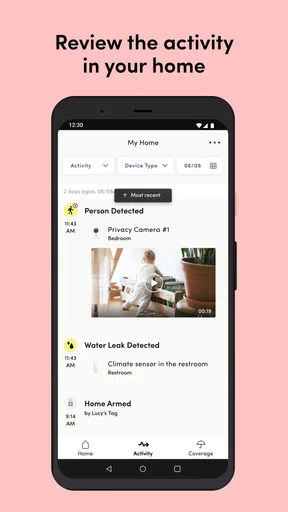
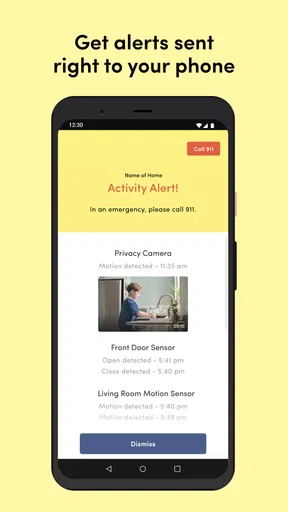
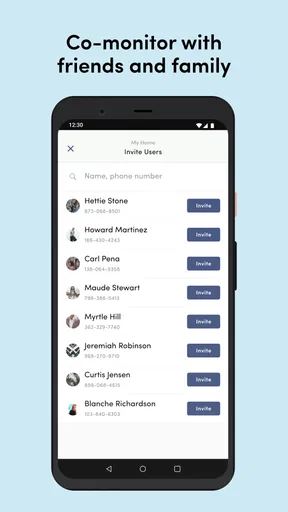
 Analysis by AppCompare
When I look at a home-security app, I do not judge it only by whether it can send an alert. I also ask whether I can understand what is happening quickly, whether the main controls are comfortable to use, and whether the experience still makes sense when I am tired, distracted, away from home, or helping someone else manage a property. That is the angle I took with Kangaroo: Simple Home Security, a free House & Home app from Kangaroo Security.
Its central idea is easy to grasp: use a phone as the point from which I keep an eye on home protection while I am elsewhere. The app has a straightforward identity rather than trying to become a broad smart-home dashboard. That focus is useful for people who want a dedicated security companion, although it also means the experience depends heavily on how well the app fits their particular home setup and daily routine.
The app has reached over 500 thousand installs and holds an average rating of 3.6 from around 3 thousand ratings. Those figures suggest a product with a meaningful user base but also a mixed experience. I would not treat the rating as a final verdict; home-security software is especially sensitive to phone settings, network conditions, hardware choices, and the expectations a person brings to it.
How clearly the app communicates what is happening
I find that a security app earns trust when it makes the home’s status and recent activity easy to interpret, rather than simply putting controls on a screen. In this section, I focus on how clear communication can shape a practical checking routine, including what to verify before acting on an alert. That distinction matters most when more than one person may be keeping an eye on the home.
Readability and navigation in everyday use
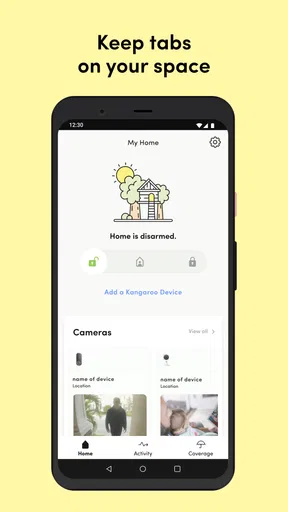
For me, the most important quality in a security app is not visual decoration. It is the ability to answer three questions without hesitation: Is my home protected, what changed, and what should I do next? Kangaroo’s simple positioning works in its favor here. A focused home-protection app is less intimidating than a large collection of unrelated automation controls, especially for someone who is setting up digital security for the first time.
I find this kind of focused layout more approachable for older relatives, occasional users, and anyone who does not enjoy learning complicated technology. The language should be read as an instruction rather than as a technical manual: check the current state, review an event, and decide whether action is needed. That makes the app easier to introduce to another person than a system built around specialist terms and dense device menus.
There is a practical distinction between a clean interface and a fully accessible interface, though. A screen can look uncluttered while still requiring careful reading, reliable touch accuracy, and good visual attention. I would therefore recommend spending time with the main status screen before relying on the app during a stressful moment. Learn where the protection state appears, where notifications lead, and how to return to the home view after opening an event.
Worth Reading Before You Choose

EA SPORTS FC Mobile 26 Is a Bigger Football Game, but It Takes Time

Flipboard Shows What News Apps Must Do Beyond the Feed

Switching to Android Auto Means Rethinking Your Driving Routine

Google Calendar Makes a Crowded Week Easier to Manage

Ludo King Makes the Most of the Minutes Between Plans

Baby Panda World Brings Quick Play to Modern Phones, but Its Game Library Feels Busy
One useful habit is to establish a personal check routine instead of opening the app randomly. Before leaving, I would confirm the home state once; after receiving an alert, I would open the notification and then deliberately return to the main status view. This reduces the chance of confusing an old event with the current condition. It is a small workflow improvement, but it matters when several people share responsibility for the same home.
The current version is 11.17.0, and the app supports devices running Android 7.0 or later. That broad operating-system reach can help households with older phones, but it also means the experience may vary according to screen size, system text settings, notification behavior, and the age of the device. I would check the actual display on the phone that will be used most often rather than assuming that a layout comfortable on a newer handset will feel equally clear everywhere.
Making status information easier to interpret
Security information should not rely on color alone. A person with color-vision differences may find green and red states difficult to distinguish, while someone using the app in poor light may miss subtle visual changes. In practice, I would look for a written state, an icon with a clear meaning, or an event description that confirms what the color is trying to communicate.
The same principle applies to alerts. A short notification is convenient, but it can be too vague if it does not identify the relevant area or explain the next step. I would keep notification previews enabled when privacy allows and make sure the phone’s general notification settings are not silencing the app. A security tool is only useful when its messages can be noticed and understood.
People who use larger system text should test whether the most important labels remain visible without awkward clipping. Enlarged text can improve readability, but it can also push buttons or status details below the first view. I would rather accept a little scrolling than reduce text size to fit everything. The goal is not to see the whole screen at once; it is to read the important information confidently.
Motor and sensory considerations
Home security often involves quick, deliberate actions rather than long sessions. That is helpful for users with limited stamina, hand tremors, or pain, because the app’s value should come from a few clear decisions instead of extended navigation. Still, quick actions create their own risk: a control that changes protection status should be visually distinct from a control that merely opens information.
I would avoid making security changes while walking, carrying groceries, or using the phone one-handed in a crowded place. A larger phone can provide more room for reading, but it may be harder to hold. A smaller phone can be easier to grip while making text and touch targets less comfortable. The best setup is the one that lets the main status and action controls be used without stretching, repeated tapping, or guessing.
For users with low vision, the phone’s built-in magnification, display scaling, and contrast settings may improve the experience, but these tools should be tested before an emergency. Magnification can make a control easier to inspect while also requiring more panning. Voice features may help with reading notifications, yet spoken content can expose sensitive information in public. Accessibility is therefore partly a matter of configuring the phone and partly a matter of choosing a safe environment for use.
For users who are deaf or hard of hearing, visual notification behavior becomes especially important. A vibration or sound cannot be the only cue that matters. I would watch how the app presents an alert on the lock screen and confirm that the phone can provide a visible signal. Conversely, people who are sensitive to sound may prefer a quieter notification setup, provided they still have a dependable way to notice important events.
People with cognitive disabilities can benefit from a consistent routine and a limited number of trusted users. I would write down a simple household instruction such as “check the current state, read the newest event, then contact the agreed person.” That is safer than expecting someone to remember a complicated sequence under pressure. The app can be part of an accessible plan, but it should not be the entire plan.
Situational access outside the home
The app is most useful when the person checking the home is not physically there. That includes a commuter confirming the house after leaving, a family member checking in on a relative, or a renter wanting a single place to review home-protection information. In each case, the phone is being used in a different context, and the ideal interaction changes with it.
Consider a realistic morning: I leave for work, get halfway to the station, and realize I cannot remember whether I completed my home-security routine. A focused app can reduce that uncertainty by giving me a remote point of reference instead of forcing me to turn around. The important part is not merely opening the app; it is checking the current state and interpreting it correctly before deciding whether anyone needs to return home.
Another scenario is helping a family member who is not comfortable with smartphones. I would avoid handing over every setting and instead agree on one or two actions they actually need. A large number of shared controls can create confusion, especially if different people assume someone else has already checked the home. Clear household roles are more valuable than giving everyone unrestricted responsibility.
Travel introduces a different challenge. A person may be in a noisy airport, a dim hotel room, or an area with unreliable connectivity. I would not wait until travel day to discover that the app’s alerts are hidden by a focus mode or that the phone’s battery-saving behavior interferes with timely notifications. Testing the exact travel setup beforehand is one of the most useful steps I can recommend.
Situational access also includes privacy. Reading a home-security alert on a shared screen or speaking commands aloud in public can reveal information to people nearby. I would use discreet notification previews when appropriate and avoid discussing detailed home events where others can hear. Convenience should not quietly become a privacy problem.
Where the app may not be the right fit
The strongest alternative to a focused app is often the platform already used by the household. If someone has built a large smart-home system around another ecosystem, adding a separate security application may create duplicated alerts, separate accounts, and more places to check. In that situation, the existing platform may be better for consistency, even if it is less simple at first.
A traditional professionally monitored security service can also be a better choice for someone who wants assistance beyond phone notifications. A person living alone, someone who travels for long periods, or a household that cannot reliably respond to alerts may need a broader safety arrangement rather than an app-centered routine. Kangaroo is more appealing to people who want personal oversight and are prepared to stay engaged with their home status.
I would also be cautious if the intended user struggles with small touch controls, frequent authentication steps, or interpreting ambiguous alerts. The app may still be workable with a larger phone and help from a trusted person, but it should not be presented as automatically accessible simply because the concept is simple. A short trial with the actual user is more informative than a promise that the interface will suit everyone.
Another trade-off is attention. A security app can provide reassurance, but repeated checking can become stressful. I would decide in advance which events require immediate action and which can wait for a convenient review. That boundary keeps the app useful without turning every phone vibration into a crisis.
Remaining barriers and practical setup advice
The first barrier is dependence on the phone itself. If the device is out of battery, muted, misplaced, or configured to restrict notifications, the person may miss the information they expect to receive. Before relying on the app, I would check battery habits, notification visibility, and whether the phone is normally carried by the person responsible for responding.
The second barrier is shared understanding. Two household members may read the same status differently or assume that a notification means the same thing as a confirmed emergency. I would create a plain-language agreement: who checks first, who contacts the resident, and when an event should be escalated. This is not a feature of the app, but it determines whether the app helps or adds confusion.
The third barrier is physical and environmental. A person with limited dexterity may need a stable surface rather than one-handed operation. Someone with sensory sensitivities may need reduced sounds and predictable visual cues. Someone with low vision may need a larger display and extra time. These adaptations are individual, so I would test them in the actual rooms and lighting conditions where the app will be used.
Because the app is free, it is easy to try without committing money at the start. That lowers the barrier for households that want to explore a dedicated home-protection tool. Free does not mean effortless, however. The real investment is attention: setting up a routine, learning the status language, and making sure every person who may respond understands what to do.
The content rating is Everyone, which makes the app broadly suitable from an age-classification perspective. That should not be confused with suitability for every ability or every responsibility. A child may be able to open the app, but a household should still decide whether that child should be responsible for interpreting alerts or changing protection settings.
Kangaroo Security has kept the product centered on home protection rather than presenting it as a general-purpose lifestyle app. I appreciate that narrower purpose because it gives the review a clear question: can this become a dependable part of a household’s safety routine? My answer is yes for people who want a simple, phone-based point of control and are willing to test the experience on their own devices.
An inclusive verdict for different households
My overall impression is cautiously positive. Kangaroo: Simple Home Security is most convincing when I treat it as one clear layer in a home-safety plan, not as a replacement for judgment, communication, or every other security option. Its free access, focused purpose, and support for older Android devices make it approachable, while the moderate average rating reminds me that real-world satisfaction will vary.
For a person who wants to check home protection remotely, prefers a less crowded app, and can comfortably read notifications and use touch controls, it is worth trying. It may also suit a family coordinating basic remote checks, provided everyone agrees on responsibilities. The strongest accessibility benefit is conceptual simplicity: there is less to learn than in a full smart-home control center.
I would skip it, or at least test it very carefully, if the household needs professional monitoring, has unreliable phone access, or depends on highly specialized accessibility support. I would also choose an alternative when all other home devices already live comfortably inside another ecosystem and a second security app would create more confusion than convenience.
My practical recommendation is to install it on the phone that will actually be carried every day, adjust text and notification settings for the intended user, and practice the check-and-respond routine before an alert arrives. If the user can identify the current state, read an event, and complete the needed action without help, the app is doing its job. If those steps require guesswork, the problem is not solved by a simple label alone.
In short, this is a sensible option for people seeking a dedicated home-security companion rather than a sprawling automation suite. It supports several everyday contexts, but inclusive use depends on careful setup, clear household roles, and honest testing with the people who will rely on it. That balance is why I see it as a useful starting point for remote home protection, not a universal answer for every home.
Pros
- Quick setup with an intuitive
- beginner-friendly interface.
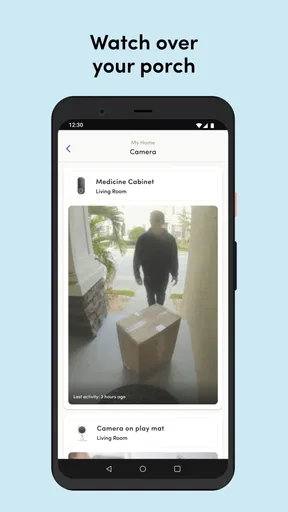
- Turns spare phones into affordable cameras without extra hardware.
- Live video helps monitor rooms
- pets
- children
- or entryways remotely.
- Motion alerts can draw attention to unexpected activity quickly.
- Useful two-way communication for checking in or speaking to someone at home.
Cons
- Performance depends heavily on stable Wi-Fi and reliable phone power.
- Older smartphones may overheat or drain their batteries during continuous use.
- Some advanced monitoring features may require a paid subscription.
- Camera placement can be limited by charging cables and available outlets.
- Privacy may be a concern when repurposing personal phones as indoor cameras.
FAQs for Kangaroo: Simple Home Security
What is Kangaroo: Simple Home Security?
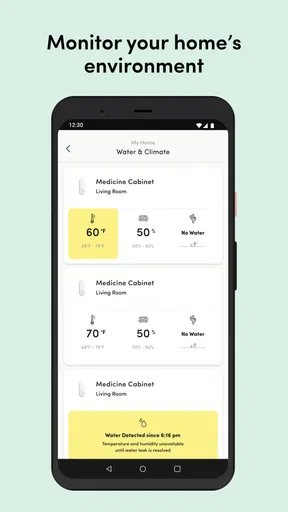
Kangaroo: Simple Home Security is a smart home monitoring app designed to help you keep an eye on your home through compatible Kangaroo devices. Depending on the products installed, the app can provide alerts for activity such as open doors, motion, leaks, or changes in the home environment. It brings device management, notifications, and monitoring tools together in one relatively simple interface.
What devices are compatible with the Kangaroo app?
The app is intended to work with Kangaroo’s connected home security products, such as motion sensors, entry sensors, cameras, water and climate monitors, and related accessories. Compatibility can depend on the exact product model, region, and subscription plan. Before downloading, check the device packaging or Kangaroo’s official compatibility information to confirm that your hardware can be added to the app.
Does Kangaroo: Simple Home Security require a subscription?
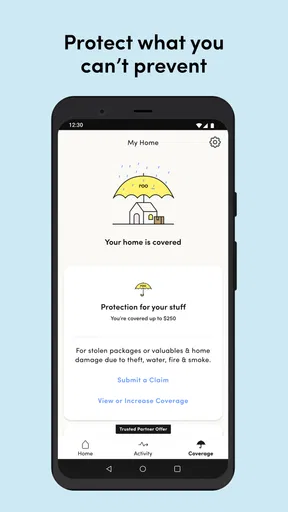
Some Kangaroo features may be available without a paid plan, while advanced services can require a subscription. Depending on the current offering, subscription benefits may include professional monitoring, extended video or event history, cellular backup, insurance-related features, or additional alerts. Review the pricing and plan details in the app or on the official website, since available features and terms may change over time.
Does the app provide professional emergency monitoring?
Kangaroo can offer more than basic self-monitoring, but professional emergency response is not automatically guaranteed for every user or device. Availability may depend on your location, selected plan, installed equipment, and account setup. The app can send notifications when an event is detected, but users should carefully configure contacts, permissions, and response preferences rather than assuming that every alert will trigger emergency services.
What should I check before installing and using Kangaroo?
Before installing Kangaroo: Simple Home Security, make sure your Android or iOS device has a stable internet connection, enough storage, and permission settings that allow notifications and background activity. You will also need a Kangaroo account and compatible hardware for most monitoring functions. Place sensors according to the instructions, test each alert, and remember that no connected security system should replace sensible precautions such as locked doors and working smoke alarms.


